
The Bill You Don't See Coming: AWS Extended Support Surcharges
AWS doesn't just deprecate old versions — it bills you for keeping them
Most cost-optimization conversations focus on things you can see: an oversized EC2 instance, an idle RDS database, a forgotten EBS snapshot. But AWS has quietly built a second category of cost risk that is much easier to miss — Extended Support surcharges for running outdated engine versions past their standard support window.
The mechanism is simple and, for many teams, invisible until the invoice arrives:
- AWS ends "standard support" for a Lambda runtime, an RDS/Aurora engine version, an EKS Kubernetes version, an ElastiCache Redis version, or an OpenSearch/Elasticsearch domain version.
- Instead of just cutting you off, AWS auto-enrolls the still-running resource into a paid Extended Support tier.
- Nothing breaks. No alarms fire. The workload keeps running exactly as before — just at a materially higher hourly rate, sometimes double, billed automatically and continuously until you upgrade.
GreenOps Scan now proactively detects this across six AWS services, tells you exactly how many days you have left, and estimates the monthly surcharge in dollars — before it shows up as a mystery line item.
What's covered
| Service | What triggers a finding | Extended Support cost model |
|---|---|---|
| Lambda | Runtimes past end of security-patch support (e.g. Node.js 16.x, 18.x) | No direct AWS surcharge, but the function silently stops receiving security patches |
| RDS / Aurora | MySQL, PostgreSQL, Aurora MySQL, Aurora PostgreSQL versions past standard support | Flat per-vCPU-hour rate, billed continuously |
| DocumentDB | Engine versions past standard support (e.g. 3.6) | Same per-vCPU-hour billing model as RDS |
| EKS | Kubernetes versions past standard support | Flat $0.60/cluster-hour during Extended Support, vs. $0.10/hour standard |
| ElastiCache (Redis OSS) | Redis 4, 5, and 6 past their standard support end dates | 50–100% surcharge on top of regular node pricing |
| OpenSearch / Elasticsearch | Legacy domain versions past standard support | Up to 100% surcharge — effectively doubling instance cost |
Six services, one consistent idea: an old version isn't just a security or compatibility risk anymore — for most of these it's a recurring bill that keeps growing the longer you wait.
Why this is easy to miss
Extended Support billing doesn't show up as a separate, clearly labeled line item that jumps out at you. It's baked into the existing per-hour charge for the resource, so a database that always cost roughly the same amount can quietly start costing 50–100% more without a corresponding change in usage, traffic, or instance size. Unless someone is actively cross-referencing every engine version against AWS's published support calendar — for every RDS instance, every EKS cluster, every ElastiCache node, every OpenSearch domain, across every region — this is the kind of cost creep that survives multiple billing cycles before anyone notices.
Here's a real AWS Cost and Usage graph from an account that didn't catch it in time:
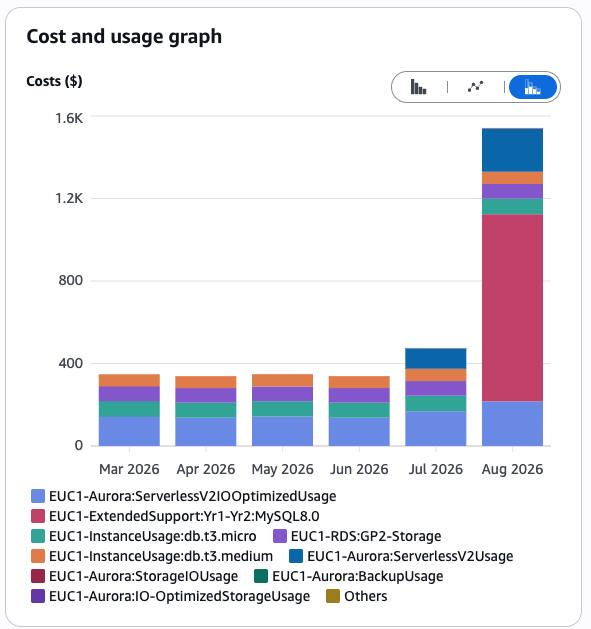
One new line item — ExtendedSupport:Yr1-Yr2:MySQL8.0 — appeared and immediately became the single largest cost driver on the account that month, more than tripling the total bill on its own. Nothing else changed: same instance sizes, same usage pattern, same everything except the MySQL 8.0 engine crossing into its Extended Support window. This is exactly the kind of jump greenops-scan is built to catch weeks in advance, while the finding is still deprecating-soon and there's no surcharge yet.
How the scanner finds it
GreenOps Scan ships a shared, date-aware deprecation registry built from AWS's own published support schedules. Every relevant scanner module — Lambda, RDS, EKS, ElastiCache, and now OpenSearch — checks each resource's engine or runtime version against that registry during a normal scan. No extra permissions, no separate command: it runs as part of the same read-only scan you already do.
Findings are split into two severities so you have room to plan rather than scramble:
deprecating-soon(medium severity) — standard support ends within the next 180 days (90 for EKS). No surcharge yet, but the clock is running.deprecated(critical severity) — standard support has already ended. The estimated monthly surcharge is included in the finding.
Here's what that looks like in the scanner's output (now rendered as a readable, copy-paste-friendly YAML-like list rather than a wide ASCII table):
  - severity: CRITICAL
    module: OPENSEARCH
    resource: legacy-search-domain
    resourceType: OpenSearch Domain
    issue: Elasticsearch 7.1 is past standard support (ended 2025-11-07) — Extended Support surcharge now applies
    costSavings: $657.00/mo
    confidence: MED
    co2Savings: 0.00 kg/mo
    recommendation: Upgrade the domain's engine version to eliminate the ongoing Extended Support surcharge

  - severity: MEDIUM
    module: RDS
    resource: prod-orders-db
    resourceType: RDS Instance
    issue: mysql 8.0.35 reaches end of standard support on 2026-07-31
    costSavings: $0.00/mo
    confidence: MED
    co2Savings: 0.00 kg/mo
    recommendation: Plan an upgrade before standard support ends to avoid the Extended Support surcharge
Notice the second finding: zero savings today, but a clear warning with a date. That's the point — catching this before the surcharge starts is strictly better than catching it after.
Why "migrate" is the right framing, not just "cut a cost"
Most GreenOps findings are pure cost optimization: right-size this, delete that, turn this off overnight. Deprecated-version findings are different — they're really a migration backlog, and treating them that way changes how you should prioritize:
- They compound. Extended Support windows have their own expiration dates. Miss the window and AWS force-upgrades or further restricts the resource — you lose the option to choose your own migration timing.
- They're not a one-time fix. Unlike an idle instance you can delete once, a version upgrade requires actual engineering work: testing, compatibility checks, a maintenance window.
- The dollar figure is a forcing function, not the goal. The real win isn't the surcharge avoidance — it's staying on a supported, patched, current version. The cost estimate just makes it easier to get the work prioritized against everything else on the backlog.
What to do when you see one of these findings
- Deprecating-soon findings: file a ticket now, while there's no financial pressure and the whole team can plan a calm upgrade instead of a fire drill.
- Deprecated findings: check the estimated monthly surcharge against the cost of the upgrade work — for most workloads, the upgrade pays for itself within the first billing cycle.
- For clusters/domains you can't upgrade immediately: at minimum, get the upgrade scheduled with a target date, since the surcharge accrues every hour the resource stays on the old version.
Try it
If you already run greenops-scan, the deprecation checks run automatically — no new permissions, no new flags:
npx greenops-scan
If a resource in your account is currently in (or approaching) Extended Support, you'll see it flagged with the exact standard-support end date and an estimated monthly cost. If nothing shows up, that's a genuinely good sign — it means your Lambda runtimes, databases, clusters, caches, and search domains are all on currently-supported versions.
Tags: #AWS #CloudCostOptimization #FinOps #ExtendedSupport #RDS #EKS #Lambda #ElastiCache #OpenSearch #GreenOps