
Cloud Cost & Carbon Savings: The Full Presentation
Where your AWS budget actually goes — a 28-slide walkthrough, embedded below
This is the slide deck we use to explain cloud waste to engineering teams: why every AWS account accumulates it, where the money actually goes, what it looked like on a real account, and how the free GreenOps Scan CLI finds it automatically.
No signup required, no gated download. The whole deck is embedded right here — or grab the PDF and share it internally:
Download the slide deck (PDF, 28 slides)
What's in the deck
The presentation is in three parts:
- Why your account is probably wasting money right now. Industry surveys put cloud waste at 27–32% of spend, account after account. Nothing has to go wrong for this to happen — instances sized for launches that ended, caches resized for spikes that never came back, buckets whose owners moved on. Each resource looks reasonable on its own; the waste only shows up when you look at all of them at once.
- The most impactful ways to cut cloud cost. The four categories that show up most often, ranked: S3 buckets without lifecycle policies, idle and oversized ElastiCache clusters, oversized compute (EC2, Fargate, RDS), and orphaned EBS volumes and snapshots.
- GreenOps Scan. How the CLI works, what it can access (read-only AWS APIs — nothing it can modify), where your data goes (nowhere — it runs locally), and a live walkthrough of the terminal output and generated PDF report.
The slide that gets the most questions
Two scans of the same development account, eight weeks apart:
- Scan 1: account billing $7,726.20/month. The scanner found 53 findings totaling $1,176.83/month in identifiable waste. Largest line items: ECS ($3,235.93/mo) and DocumentDB ($1,506.78/mo).
- Scan 2: after the team reviewed and acted on a subset of the findings, the account's own Cost Explorer graph shows the bill dropping from ~$7,800 to ~$4,600/month over the following two months.
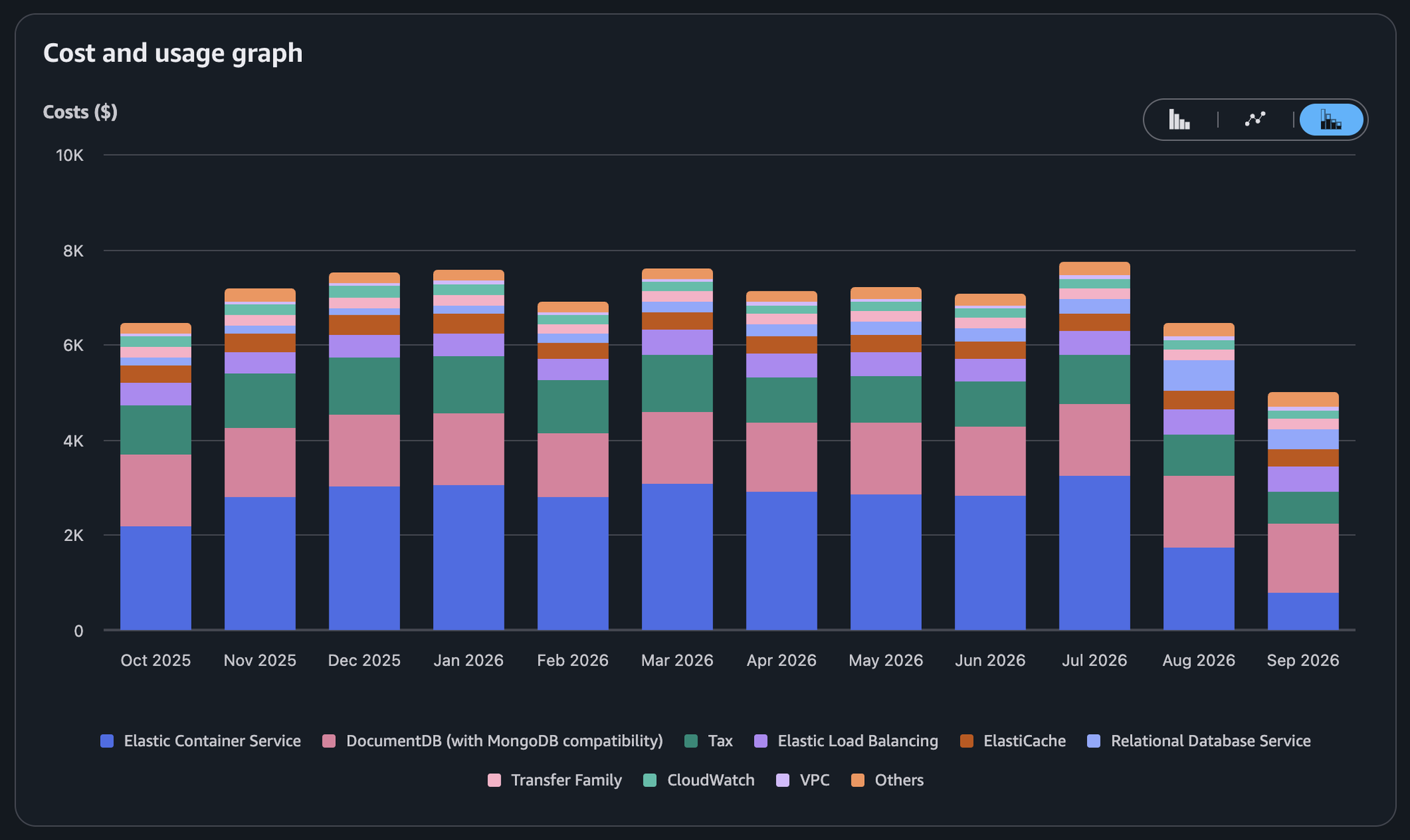
The pattern matters more than the numbers: scan → review findings with the resource owners → fix what makes sense → re-scan to measure the delta.
Why read-only is the whole point
The deck spends a full section on safety because it's the objection every team raises first:
- The CLI calls read-only AWS APIs only —
Describe*/Get*/List*style calls across up to 14 service modules. It cannot modify, stop, resize, or delete anything. - It runs locally on your machine. Your AWS credentials never leave it, and nothing is uploaded anywhere — the report stays local unless you choose to share it.
- You don't have to trust the binary. Attach AWS's managed
ReadOnlyAccesspolicy to a dedicated scan profile and the guarantee is enforced by IAM, not by the scanner's code. The deck includes the four CLI commands to set that up in under five minutes, and there's a step-by-step walkthrough on the blog.
Try it on your own account
npx greenops-scan
The CLI is free to use, takes about a minute end-to-end on a typical account, and produces a terminal summary, a JSON report, and a branded PDF. Read-only — safe to point at a real account today.
If the deck raises a question it doesn't answer, the rest of the blog goes deeper on every category it covers — S3 lifecycle policies, orphaned EBS, Graviton right-sizing, ElastiCache, NAT Gateway data tax, and more.